Terminal Portfolio
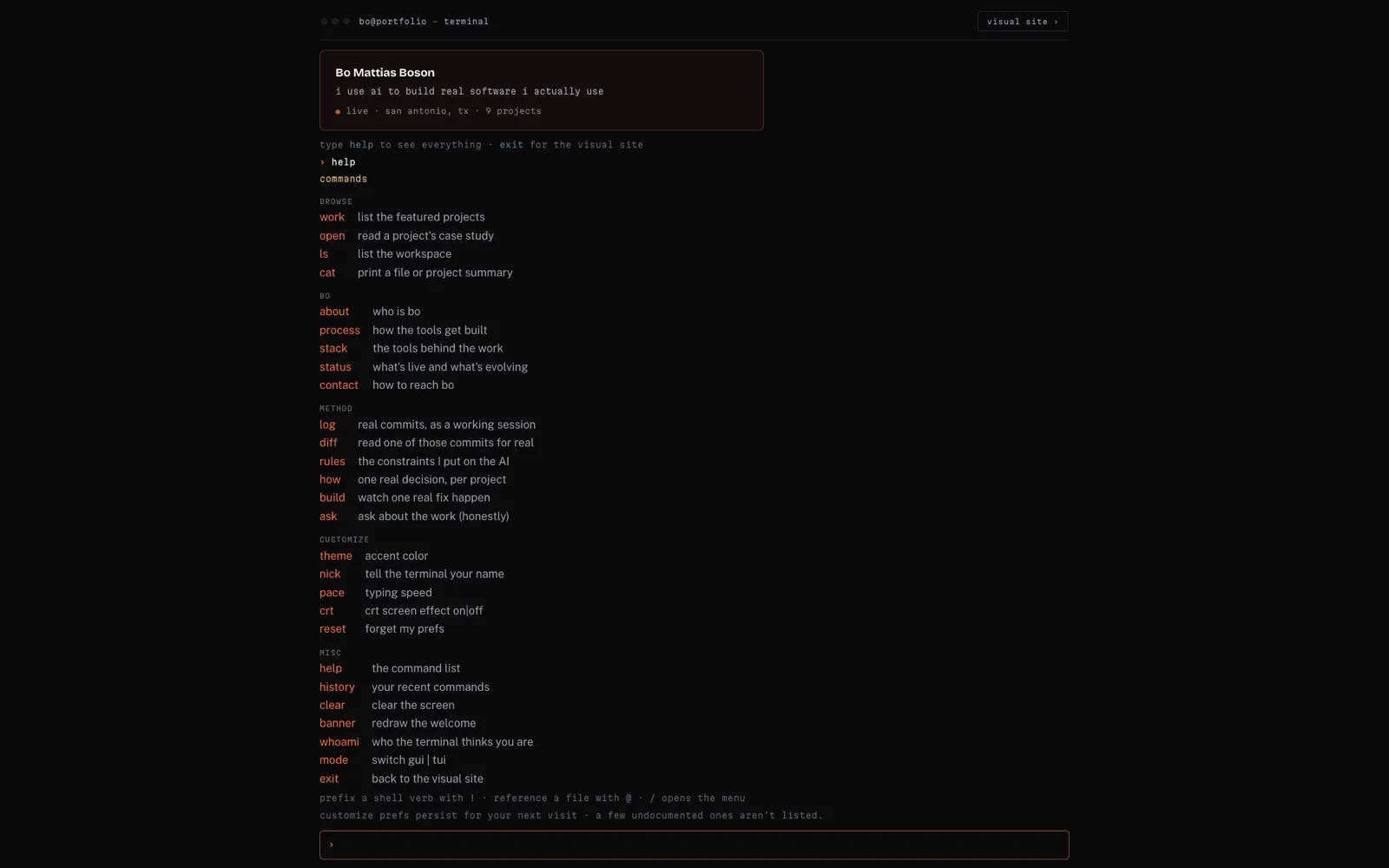
The same portfolio as a text terminal, styled after Claude Code: every section is a command you type, and one command reads a whole case study.
At a glance
- Problem
- I wanted a second way into this site that looks and behaves like the terminal Claude Code runs in, without getting in the way of readers who'd rather scroll.
- My role
- I designed the commands and how each one behaves, directed the build in Claude Code, and tested it.
- Result
- On desktop the whole site works as a terminal, every section a command, built from the same source as the graphical pages so the two can't drift apart.
The terminal runs in a desktop browser with motion turned on. The case studies are all here.
At a glance
- Problem
- I wanted a second way into this site that looks and behaves like the terminal Claude Code runs in, without getting in the way of readers who'd rather scroll.
- My role
- I designed the commands and how each one behaves, directed the build in Claude Code, and tested it.
- Result
- On desktop the whole site works as a terminal, every section a command, built from the same source as the graphical pages so the two can't drift apart.
Under the hood — for the technical folks
I built the terminal in Claude Code: I designed the commands and how each one behaves, directed the build, and tested it. It’s TypeScript inside the same Astro site, with no framework of its own.
The terminal keeps no second copy of the site’s words. At build time the site turns the same case-study markdown and the same settings file the graphical site uses into one block of data on the page, and every command reads from that. Edit a case study once and both versions change.
Each command is its own file and registers itself with a small registry, so adding one never touches a shared list. The terminal started as one file of about a thousand lines holding the engine, every command and every easter egg; it was split into one file per command before anything new went in.
A small theater module draws Claude Code’s look: streamed text, a braille spinner with a verb and the elapsed time, and tool-call frames that output nests inside. It takes plain values, never HTML, which keeps anything a visitor types off the HTML path; a test types an HTML payload into ask and checks it shows up as plain text and runs nothing. Output always goes into whichever frame is open, so a frame that never closed would swallow every later command’s output, and clearing the screen resets the stack for that reason.
log, diff and build show real commits from this repo. Vercel clones the repo shallowly, so git history at build time isn’t reliable; instead a script writes a curated snapshot of commits and diffs to a checked-in JSON file, which is validated at build and scanned by the same banned-patterns check as everything else. build replays one real fix, two lines of CSS that stopped the homepage running past the edge of a phone screen, and a test checks that every line it shows is one the snapshot actually holds.
Vitest covers the pure logic: parsing input, the nearest-match suggestion, escaping, fitting art to the width, and the snapshot’s shape. Playwright covers what needs a browser: interrupting a stream with Esc, focus staying inside the terminal, the busy state while text streams, animations torn down on exit, and that injection check. The core terminal spec runs in Chromium, WebKit and Firefox; the rest runs once, in Chromium, to keep the whole suite fast enough to actually get run.
Technical highlights:
- A command registry with one file per command; an unknown command gets the nearest real one as a suggestion (Damerau-Levenshtein distance), never a bare error
/opens a command menu,@completes file names,!runs the Unix-style verbs, Tab completes, and the prompt grows as you type- A vim-style reader for
open: line numbers, frontmatter, headings and the pull quote, typed out beside an original animated mark; space or Enter skips the typing - Esc in a fixed order: stop what’s streaming, then close the reader, then return to the site. The welcome can’t be interrupted, so the first Esc always gets you out
- Streamed output is marked busy so a screen reader hears whole lines, the site behind the terminal is made inert, the mode chooser is a labelled dialog, and anything narrower than 900px hands back to the graphical site
- Preferences (
theme,pace,crt,nick) live in one saved key shared with the site’s settings page; a missing or corrupt value falls back to the default - No third-party ASCII art anywhere
What I wanted
The argument of this whole site is that I build real software by directing Claude Code, and Claude Code runs in a terminal. So I wanted a version of the site that looks and behaves like one: a second way in, for the reader who would rather type than scroll.
It came with two conditions. It had to be the same site, never a second one, so nothing could be written twice. And it could never get in the way of the reader it isn’t for: the graphical site stays the default, and the terminal is something you choose.
How I got it
It started in July as a split gate: a short boot line, claude --resume portfolio, then a choice between the graphical site and the terminal. Every section of the site became a command, and open gained a reader that types a whole case study out like a file opened in vim.
Before adding anything else, I had Claude Code take the terminal’s code apart. It had grown into one long file holding the engine, every command and every easter egg. One file per command meant later work could run in parallel, and each command could be tested on its own.
The rule that shaped the rest was honest theater. The terminal can be as dramatic as it likes in how it shows things: streamed text, spinners, tool-call frames. What it shows has to be real: real copy, real commits, real diffs. And it never fakes an answer. Anyone looking at something that resembles Claude will type a question into it, and a made-up reply would fall apart on the first question nobody planned for. So ask says plainly that this is a static page and not a live model, then points at the closest thing I’ve actually written. When nothing is close, it says that instead.
Holding to that rule meant catching the places it slipped. An early version of build showed a passing test run for a commit made before the site had any tests at all, inside the one command whose whole promise is that its material is real. It came out the same day. The reader’s mascot was a third-party ASCII dog with its signature removed, and it was replaced with an original mark: a small terminal with a blinking cursor. A borrowed block-letter title went too, and nothing replaced it, because the name is already set in large type just below.
I planned the build-out in six phases, each one finished and tested before the next, with a review after each and an adversarial audit at the end.
What it does
Load the homepage on a desktop and a short boot plays, then asks how you want to browse. Press 2, or click, and the site becomes a terminal. It remembers which one you picked, and if you don’t pick, it carries on to the plain site.
Every section is a command. work lists the projects, open meridian reads that case study top to bottom in a reader styled after vim, and about, stack, status and contact cover the rest. A second group shows how the work gets made: how tells one real decision per project, rules lists the constraints I put on Claude, log and diff show real commits from this repo, and build replays one real fix as it happened.
It behaves like a terminal. Tab completes, a typo gets a suggestion, / opens a menu of commands, and Esc steps back: it stops whatever is printing, closes the reader, then returns you to the site. theme, pace, crt and nick change the accent colour, the typing speed, the scanlines and what the terminal calls you, and the site’s settings page changes the same four.
It’s desktop-only on purpose. Phones, reduced-motion settings and browsers without JavaScript always get the plain site. And open terminal-portfolio reads this page, in the terminal.
Why it matters to me
It’s direct evidence of how I work. The graphical site tells you I direct Claude Code; the terminal shows you what that looks like, with the real rules and real commits rather than a mock-up of them.
It also proves the content stands on its own. Both versions render from one source, so a case study I edit once changes in both places, and the terminal can’t drift into saying something the site doesn’t. The rest is judgment more than features: what to dramatise, what never to fake, and keeping the whole thing out of the way of a reader who just wants the plain page.
What I learned
The bugs worth remembering here weren’t crashes. They were things that looked right. The made-up test run looked exactly like a real one. The first version of Esc-to-interrupt followed the plan to the letter and cancelled the welcome message, so the first Esc a visitor pressed did something they never asked for; Esc should get you out, so now it only interrupts work you started. And once, a test run piped into another command reported success while the tests had failed, because the result came from the wrong end of the pipe.
What I take from it is to check the thing itself, not how it looks. A green result nobody read isn’t a green result, and a feature that obeys the plan can still be wrong as behaviour.
The most convincing thing the terminal does is admit what it isn't. A faked reply would have looked better right up to the first question I hadn't planned for. Saying plainly that it's a static page, and pointing at something I actually wrote, doesn't have that problem.